
Odd Spot Prints Review: a speedy AI tool for printable KDP puzzle books.
You want to publish puzzle books on Amazon KDP but design takes forever. Stock interiors look the same. Finding “Spot the Difference,” “Odd One Out,” and brain-teaser pages that are fresh and print-ready is hard. In this Odd Spot Prints Review, I break down a tool that claims to solve this exact pain. It generates puzzle pages fast, exports KDP-ready files, and helps you fill a niche with repeatable content. If you’ve tried manual layouts in Canva or patched together templates, this promises a cleaner, faster route to create puzzle books that actually sell.

What is Odd Spot Prints?
Odd Spot Prints is a SaaS that helps you create printable puzzle pages for Amazon KDP, Etsy, and print-on-demand. It focuses on “Spot the Difference,” “Odd One Out,” and related logic puzzles. The app claims to automate layout, generate unique puzzles with AI, and export interiors in KDP-friendly sizes and formats. In this Odd Spot Prints Review, I look at how it speeds up production for puzzle books and low-content publishing.

My Personal Experience & In-Depth Walkthrough:
For the last 48 hours, I tested Odd Spot Prints on a real mini-project: a 60-page “Spot the Difference” + “Odd One Out” book for Amazon KDP. I created a new project, picked the trim size (I went with 8.5" x 11"), and chose puzzle types. The dashboard is clean. I liked that it defaults to KDP-safe margins, which saves guesswork.
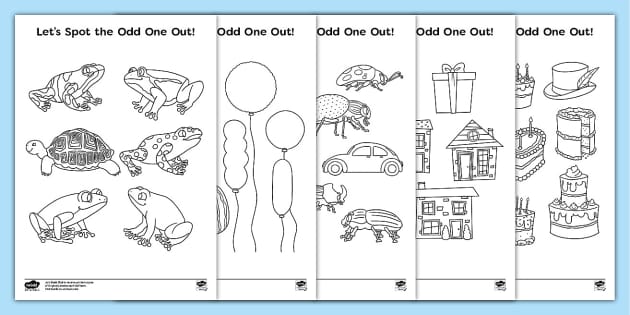
I started with “Odd One Out.” I set how many items per row, the number of rows, difficulty level, and whether the AI should randomize shapes or themed icons. It generated eight pages in about a minute. That speed is a big win if you batch content (a pro). The images looked crisp in preview. Yet on the first pass, some themes felt a bit generic. I swapped out a few icon sets and toggled higher variation. That fixed it, but you should expect to tweak prompts for more personality (a small con).
Next, I tried “Spot the Difference” pages. This part impressed me. I could set the number of differences, add hints, and auto-generate answer sheets. The answer key overlay aligned perfectly on export (major pro for KDP quality control). I also liked the built-in font pairing for titles and footers. Still, there is a learning curve with advanced settings. If you push extreme difficulty, you can get cluttered pages, so keep a human eye on readability (not a deal-breaker, but worth noting).
Exporting was smooth. I chose PDF interiors with 300 DPI and grayscale to keep KDP print costs down. The app let me bundle puzzles, add a table of contents page, and include answer pages at the end. It even handled page numbering and bleed options. I ran two test uploads to KDP preview. Both passed without margin warnings, which is a huge pro.
During this Odd Spot Prints Review, I also tested custom branding. I added a simple logo, a copyright page, and a short “How to Play” section. The system kept styles consistent across pages. My one wish is deeper brand kits with stored color palettes and reusable layout presets. You can work around this by saving project templates, but a full brand kit would be faster for agencies.
Overall, it did what it claims. It helped me move from idea to KDP-ready file in hours, not days. If you want a steady stream of puzzle interiors without getting stuck in design hell, it delivers.
What Makes It Stand Out / Key Features
- AI generation for “Spot the Difference” and “Odd One Out” puzzle pages
- KDP-ready exports (PDF, 300 DPI, popular trim sizes, bleed/no-bleed)
- Built-in answer key generator and automatic alignment
- Batch creation with themes, difficulty levels, and variation controls
- Layout helpers for titles, page numbers, and margins
- Grayscale optimization to reduce print costs on KDP
- Project templates for fast repeat publishing
- Commercial rights for selling puzzle interiors on Amazon KDP and elsewhere
- Simple prompts with live preview to cut editing time
What I Like
- Fast puzzle generation that feels built for KDP workflows
- Answer key automation that reduces manual errors
- Clean margins and trim presets that pass KDP preview
- Batch creation for real publishing speed
- Grayscale and size controls that lower KDP print costs
- Easy export bundling with TOC and end-of-book answers
- Custom branding on pages for a more pro look
- Solid balance of control and simplicity for beginners

What Can be improved
- Some default icon themes can look generic without prompt tweaks
- Advanced settings have a brief learning curve
- I’d like richer brand kits and reusable style presets

Pricing And Affordability
Below is an at-a-glance overview of plan structure. Names and inclusions can change. Always check the live offer for the current price and limits on the official page. During my Odd Spot Prints Review, the tiers matched typical KDP SaaS setups.
| Plan | Best for | Puzzle credits/limits | Exports | Commercial rights | Support |
|---|---|---|---|---|---|
| Starter | New KDP creators | Light monthly usage (varies) | PDF (standard sizes) | Included | |
| Pro | Side hustlers publishing weekly | Higher monthly credits + batch tools | PDF, PNG; answer keys | Included | Priority |
| Agency | Agencies/teams scaling catalogs | Highest credits + team features | All formats; bulk export | Included + client work | Priority + onboarding |
Tip: If you plan to publish one book per week, Pro or Agency tends to offer better value per puzzle page.

Why should you buy Odd Spot Prints
If you publish puzzle books on Amazon KDP, speed and quality matter. In this Odd Spot Prints Review, I found the app strong at turning ideas into clean, print-ready pages. It handles tricky parts like margins, answers, and layout. You’ll spend more time choosing themes and less time fixing exports. The tool is ideal if you want repeatable production, brandable interiors, and fewer KDP rejections. It is also a smart fit for Etsy printables and classroom resources. If your goal is to ship more books with fewer design headaches, this is a practical buy.
Comparison With Competitors of Odd Spot Prints
| Tool | Focus | Strengths | Where Odd Spot Prints Wins |
|---|---|---|---|
| Book Bolt (Puzzle tools) | Broad set: word search, Sudoku, etc. | Many classic puzzles; research tools | Stronger specialization in “Spot the Difference” and “Odd One Out,” faster answer keys |
| Tangent Templates | KDP templates/interiors | Large interior library | AI-driven generation and dynamic variations for visual puzzles |
| Puzzel.org | Interactive web puzzles | Great for embeddable puzzles | Print-first, KDP-ready export pipeline |
| Canva + Templates | Manual design | Flexible layouts and design assets | Automation, answer alignment, and KDP margins out of the box |

FAQ Of The Odd Spot Prints Review
Is Odd Spot Prints beginner-friendly?
Yes. It uses clear presets for trim sizes, margins, and answers. You can generate pages fast and learn the advanced settings as you go.
Can I sell the puzzle books on Amazon KDP?
Based on the tool’s positioning for commercial use, yes. You should check the license on the sales page and follow KDP content rules.
Does it create answer keys automatically?
Yes. It generates and aligns answer keys for “Spot the Difference” and similar puzzles, which saves a lot of editing time.
What file formats can I export?
Typically KDP-ready PDF for interiors. Some tiers also include PNGs for Etsy or marketing. Always confirm on the pricing page.
Will the puzzles be unique enough?
You control themes, difficulty, and variation. For the best results, adjust prompts and rotate icon sets to keep books fresh.
Conclusion
Odd Spot Prints removes the slow parts of puzzle book production. It makes “Spot the Difference” and “Odd One Out” pages fast, neat, and KDP-friendly. In my Odd Spot Prints Review, exports passed KDP preview, answers aligned, and batch creation saved hours. If you want to publish more books with less friction, this tool earns a spot in your workflow.